

Whilst a redesigned website is not usually the cause of a fall in a site’s traffic, more commonly traffic falls away due to unredirected URLs, pages being removed and/or a staging site’s noindex tag being passed on to the new website.
Correct planning is key to undertaking a good SEO migration. Firstly, a list must be compiled of all pages that currently receive traffic and/or backlinks. Next, new URLs must be decided for each page. A redirect should then be introduced. Finally, the behaviour of Google should be observed. Although these elements are not complicated, it can sometimes be challenging to decide exactly when to undertake them. Ideally, planning and preparation is completed prior to developers launching a new site. However, SEO is often considered and implemented at a later date.
Below is information on our approach to a migration. This starts with initially crawling a site and finishes with 3-months’ post-launch monitoring.
What constitutes a migration?

Google considers various types of site modification to be a migration. This can include switching to HTTPS; amending and/or merging domains; and changing URLs (for example, from example.com/page.php?id=1 to example.com/widget). Moreover, website redesigns often involve one of these components. Different CMS platforms can also use differing conventions for URLs. Likewise, someone may wish to enhance the visual appeal of URLs and so for example convert /blog/2023/post-name/ to /post-name/. Furthermore, sections of a website may be removed.
As long as a site’s URLs remain constant and only its hosting and/or design is amended then the risks involved are relatively low. However, there are still some risks. Website templates control heading, title tag and hyperlink information, as well as content quantity. Consequently, we consider all website redesigns to constitute a migration. Following the building of the new site, a new crawl is undertaken to ensure that these elements have not changed.
Define SEO requirements

Ideally this is part of the scoping process. Unfortunately, it is not often incorporated in a website redesign cost quotation. Nevertheless, it is considerably cheaper to formally define SEO requirements at the planning/development stage than it is to try and recover lost search engine rankings post-launch.
Below is a table detailing various types of migration, whether or not they alter URLs and whether or not the Change of Address tool can be used. Risk levels have also been evaluated.
| Migration type | URL alteration? | Can Change of Address tool be used? | Risk |
|---|---|---|---|
| Hosting / CDN alteration | No | No | Low |
| Website redesign (URLs unchanged) | No | No | Low to medium |
| HTTP to HTTPS | Yes (Protocol) | No | Low |
| Same domain, new URL structure | Yes | No | Medium to high |
| CMS / Platform alteration | Usually | Only if the domain is also being altered | High |
| Domain alteration and/or merge | Yes | Yes | High |
Although domain migration is generally the most risky type of migration, if you are merely adding a new domain which is mapped onto your primary domain then the process is greatly simplified. Equally, the rules governing domain forwarding SEO are less intricate.
Pre-launch
Analyse current site performance
Download historical Google Search Console information dating as far back as 16 months. Post-launch, you can then compare year-on-year data for specific weeks. Note keywords which generate user-focused traffic. Even if you are unsure how to track SEO information, it is wise to put systems in place at the planning/development stage. Moreover, use website crawling software (such as Screaming Frog) to fully crawl a site and store this information.
Unfortunately post-launch it is not possible to re-produce historical data. The data can then be analysed to ascertain whether or not the site’s traffic was adversely affected by the redesign.
It is also suitable to undertake a technical website audit of the current site. Problems such as redirecting, orphan and duplicate titles are often also present on new sites if they are not identified and corrected.
List target URLs
A CMS can generate a list of a site’s current URLs. However, this is often not wholly accurate. Google also proposes that you analyse a site’s XML sitemap, server and analytics logs to identify the most visited pages. In parallel, Search Console’s Links report provides information on which pages receive links. Comparison of these data-sets will help to formulate a list. Duplicate entries should then be deleted.
Equally, don’t overlook assets including images, PDFs and videos as these can also receive traffic and backlinks. Again, as with pages, Google advises that these should be migrated.
Let us consider a scenario whereby an older PDF containing pricing information is still being backlinked to by partner sites. However, as no-one on the redesign team is aware of its existence it does not feature on the migration list. On the new site it therefore generates a 404 error. Partner backlinks then point to this 404 error page.
Decide where pages will be relocated
Pages can either stay in their original location, be redirected, merged or removed. If pages are removed then a 404 or 410 status code should be issued.
Where practicable, we seek to retain page URLs as these are often performing well. Redirecting solely for the sake of having a more concise or attractive URL slug is not usually desirable. URLs should therefore only be redirected if there are real problems with them. For example, if they contain parameters or dates which make evergreen pages seem dated.
Moreover, content should be considered. Often this is reduced during a website redesign. If a page previously ranked highly for numerous long tail keywords and then its content is cut in half then it is probable that some of those rankings will be impacted. Thus, it is important to establish early on in a project which pages will maintain their full content.
Compile a redirect list
Our redirect list comprises a spreadsheet. Each old URL is represented by a spreadsheet row. Further columns detail the new URL, status code and notes on 404s and merged pages. Broad migrations for example of an entire blog area can be covered by a general rule which applies to a number of spreadsheet rows.
Confirm that new URLs are active. Google indicates that redirects to non-existent pages is a common migration problem. Therefore, pre-launch it is advisable to confirm that all URLs in the ‘new URL’ column are functioning. Once again, this can be achieved by crawling a site.
Pass on website SEO
Information such as title tags, meta descriptions, headings, body text, image alt texts and structured data should be moved over from old pages to new ones. Occasionally new templates automatically truncate title tags or pull them from a different data source. It is therefore advisable to review the staging site to ensure that the right information is being displayed.
All new URLs should also incorporate self-referencing canonical tags. Furthermore, if a site has multiple language versions then hreflang tags should be amended to match new URLs. Again, this is something that Google advises.
Internal hyperlinks must lead directly to new URLs. Both individuals and Googlebot should not be obliged to navigate via redirects. Utilise a find and replace function on a database to apply the redirect list. Subsequently, re-crawl a site. For information on ensuring key pages continue to sufficiently benefit from internal linking please see our guidelines on internal linking best practices.
Configure a staging site and Search Console
Password protection is the most secure method of preventing a staging site from being accessed by Google. However, if your developers protect a staging site using robots.txt and/or noindex tags then precisely which of these need eliminating from the live site must be noted. Google suggests creating such a list in advance. Remaining robots.txt and noindex tags are cited by Google as a typical migration problem.
Register both the old and new sites on Search Console. Ensure that all versions of a site (including www and non-www, and HTTP and HTTPS) are registered. If domains and/or sub-domains are being migrated then re-upload a disavow file to a new Search Console property. In addition, if a new domain has been second-hand purchased then check it for manual actions and previous URL eliminations by the previous owner.
How we handle SEO redirects
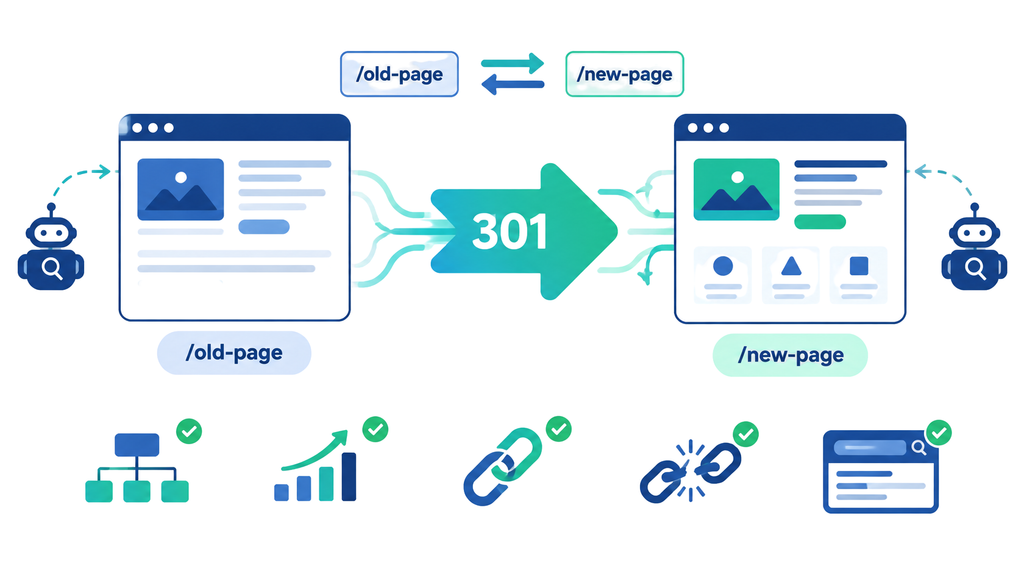
As redirects are of primary importance in migrations, we adhere to rigorous processes in this area.
Both 301 and 308 are server-side redirect status codes. Neither causes a loss of PageRank, according to Google. JavaScript and/or meta refresh redirects should only be used if a server is unable to facilitate redirects.
Each old URL must be redirected to just one new URL. Although Googlebot can follow up to 10 redirect links, Google promotes the use of direct redirects. If this is not possible then redirect chains should, if at all, be of no more than 3 levels. Usually, chains are formed through successive redesigns. For example, if 3 years ago a page was redirected from /a to /b and /b is now redirected to /c then those visiting /a will first be directed to /b (unless the original redirect is modified). Amend the original redirect so that it leads to /c.
Never redirect numerous old URLs to a homepage. Google may view this as a soft 404. Also, individuals clicking on specific pages will be directed to an inappropriate location. Ideally each old URL should redirect to the most relevant new URL. Alternatively, a 404 can be issued if there is no suitable new page.
Redirects should ideally be maintained for a prolonged period of time. Google documentation suggests a minimum duration of one year as this allows Google to recrawl a site and re-allocate backlinks. We choose to maintain redirects indefinitely for all old URLs which continue to receive backlinks as, by deleting them, these backlinks become dead.
Day of launch
Endeavour to launch a site during a quieter time of operation (where applicable). Doing so minimises the number of people who are affected if problems occur. Moreover, extra server resources are available for Googlebot to crawl a site. We also avoid launching on a Friday as it is undesirable to have to resolve redirect related issues at the weekend.
On the day of launch:
- Activate the redirect list and confirm that server settings have been correctly implemented.
- Delete the staging site’s robots.txt and noindex tags from the live site (as detailed on your list).
- Crawl old URLs and ascertain that each one redirects to just one new page with a 200 status.
- Randomly check canonical tags on key templates to confirm that new URLs are being referenced.
- Upload a new XML sitemap to Search Console.
- If domains and/or sub-domains have been altered then submit Change of Address details for all validated old site versions.
- Update manually managed links such as advertising, social media, email signatures and directories.
Finally, use the Search Console URL Inspection function to individually analyse how Googlebot is accessing and displaying your key pages.
3 month post-launch monitoring
Often, post-launch a site’s search engine rankings fluctuate. Google states that this is typical. It adds that for a small to medium-sized site the majority of pages will take a few weeks to move to their new URLs. Larger sites require more time. Importantly, re-positioning occurs page-by-page. Complete re-positioning does not occur until Googlebot has crawled all URLs on both the old and new sites at least once.
Weekly monitoring of Search Console is advised. Indexed page numbers should decrease for the old site and increase for the new site. Should both a new and old sitemap be uploaded then you can observe the old one becoming empty as the new one is populated. Google indicates that it is acceptable to ignore any redirect related alerts which appear in relation to the old sitemap. Compare page clicks with baseline information and analyse data for equivalent weeks of last year where appropriate (bearing in mind seasonality).
Server logs too should be reviewed. Immediately after a migration, sites tend to experience above average levels of crawling. As well as Googlebot routinely crawling sites, new URLs are also crawled as they are referenced by redirects from the old site. Investigate 404 and 5xx status codes. Additionally, ensure that your hosting provider can support the increased server demand.
Beyond the initial couple of weeks, externally sourced links should be analysed. Old URLs should be ordered by the number of referring domains. Thereafter, contact those who own websites linking to your most highly back-linked pages and request them to update their links. This is the same process as link reclamation. Each revised link reduces a redirect level.
Typically we become concerned if, 6 to 8 weeks post-launch, a site element continues to markedly under-perform in relation to baseline data. Assuming that a site’s redirects have been effectively implemented we then investigate the content and internal linking for that site element.
Common causes of reduced traffic post-migration
Generally speaking the biggest challenges are often encountered when extensive alterations are implemented simultaneously. Google suggests that changes should be introduced sequentially. Usually, this would involve first migrating to a new domain and then changing a site’s design. If a domain, CMS and design are all altered on the same day then it can prove difficult to ascertain which of these elements led to a fall in traffic. Consequently, remedying such a situation takes much longer.
Navigation changes can also tend to have a more detrimental effect than is often recognised. If a page is moved from a main menu to a footer hyperlink then it will have fewer internal links. Even if its URL remains static, this can therefore influence its search engine ranking. Website navigation should be analysed alongside the compilation of a redirect list.
Furthermore, additional risk arises if a new site utilises JavaScript to display core content. Immediately after launch, it is important to examine how HTML appears in the URL Inspection tool. Even if a page displays fully within a browser, the version of that page that Google accesses can in fact comprise a very small amount of text.
Finally, the old domain should be retained. Google’s Change of Address documentation advises that this should be paid for for at least one year post-migration. Doing so prevents others from purchasing and misusing it. As the annual cost of maintaining a domain is relatively low, we prefer to keep it in perpetuity.
Planning your SEO migration
Generally speaking, poor early project planning is to blame for post-redesign ranking falls. Often a redirect list is never compiled and/or pages are removed without first investigating what they ranked for. Excellent migration planning involves incorporating within a project plan the identification of old URLs, the compilation of a redirect list, and the investigation of pages’ ranking information. Ideally, one individual will be responsible for managing a redirect list. Moreover, several weeks post-launch someone should still be reviewing Search Console data even if the remainder of a project team has moved on.
Should you be in the process of planning a website redesign, the initial step is to crawl your existing site and establish baseline data. Without this there is no dependable means of ascertaining what has been gained and/or lost by a new site.
FAQ
How quickly does web traffic stabilise again post-migration?
Usually, for a smaller to medium sized website, pages will begin to re-index within a couple of weeks. Larger sites will take longer. Traffic can fluctuate during this period. You should check the performance of any areas of your website around two months post-migration. Assess the redirects, content and interlinking if there continues to be significantly poor performance.
Can a site re-design negatively impact on SEO, even if URLs remain the same?
Yes. Re-designing a site alters elements such as title tags, headers and inter-linking together with the amount of content. All of these can then in turn influence a site’s search engine ranking. Pre-migration, carry out a crawl and analysis of both the new and current websites.
For how long should 301 redirects be left in place?
Google recommends that they should be left in place for as long as possible, usually a minimum of one year. We leave 301 redirects in place for ever for old URLs which continue to receive links to them.
Does implementing 301 redirects reduce link popularity?
According to Google, 301 and other types of permanent redirect do not result in a reduction of PageRank. However, extended redirect paths should still be avoided as they can impede user experience. Furthermore, not all browsers handle lengthy redirect sequences effectively.
Is it essential to submit a Change of Address to Search Console?
Just when migrating between different domains or sub-domains. Google clarifies that it is not essential to utilise this facility if a site is merely re-directing from HTTP to HTTPS, or between www and non-www versions of a site. It is also not required if a site is re-allocating URLs within the same domain.
Should I migrate my site all at once or in stages?
Google proposes that smaller and medium-sized sites are best migrated in one operation so as to assist Google in acknowledging the migration. Sections of larger sites can be migrated sequentially. Often this facilitates issue detection and rectification.